
Choose what to ask.
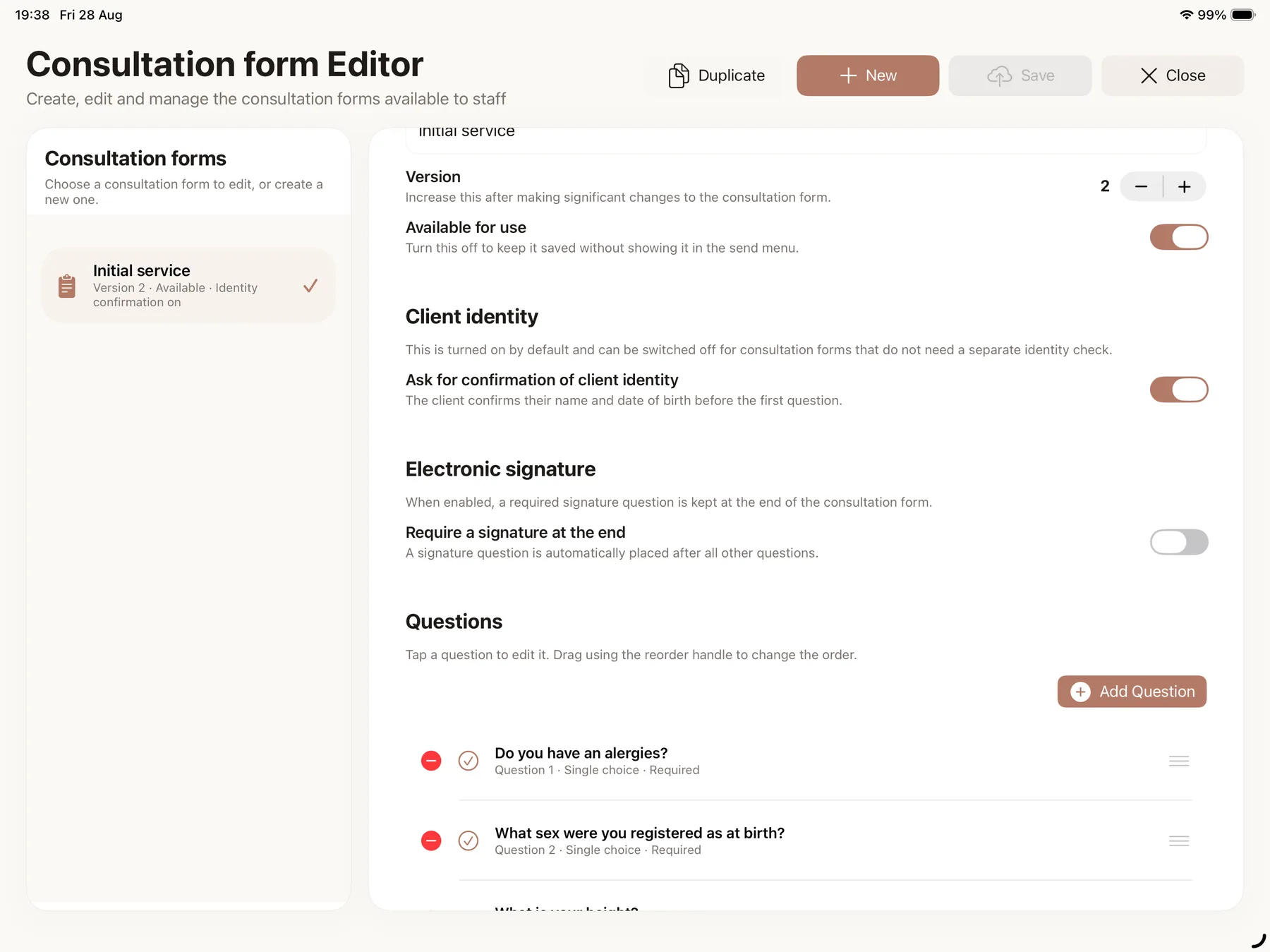
Build a consultation form with your own questions. Use text answers, choices or confirmations, and decide which questions require an answer.
FOR UK SALONS · CUSTOM FORMS ON GROW & PRO
Write your own consultation questions, send a secure email link and keep the completed responses with the client record. Find the details alongside their appointments and notes in Muluno.
Free includes client notes and appointment history. Custom forms and secure email delivery are on Grow and Pro; paired client-room iPads and kiosk check-in are Pro features.
7 days of Pro. No card. No automatic charge.
YOUR QUESTIONS, BEFORE THE APPOINTMENT
Use a form for the questions you want a client to answer, and notes for what you want to record about their visits.
Build a consultation form with your own questions. Use text answers, choices or confirmations, and decide which questions require an answer.
Choose a form and send it by email from Muluno. The client can complete it through the secure browser link, without downloading the salon-management app.
Open the client's consultation history to review their responses before the visit. Keep general client notes and individual appointment notes in their own places.
Custom forms and email delivery require Grow or Pro, a set-up Muluno booking address, enabled forms and email modules, and staff permissions. The client record needs a surname, valid email and phone details for delivery and the identity check.
QUESTIONS WRITTEN FOR YOUR BUSINESS
Create a form around the information you want before a service. Add your questions, choose the answer types and arrange their order. You can mark questions as required and add helpful guidance where an answer needs explaining.
If you choose to include an electronic signature, it sits at the end and is required for that form. You can also use a form without a signature. The questions and any statements you include are your responsibility.
On Grow and Pro. A form can include one electronic signature, placed last and required when included. A form or signature does not by itself establish legal compliance or decide whether a treatment is suitable.
SECURE EMAIL LINKS AND COMPLETED RESPONSES
Choose the consultation form you want to send and email a secure link from Muluno. Clients complete it in their browser. You choose when to send it, so you can request the form that fits the visit.
Completed responses remain in the client's consultation history. Forms sent for an appointment also stay connected to that visit, so you can review the answers with the rest of the appointment details.
Grow or Pro, a set-up Muluno booking address, enabled forms and email modules and staff permissions are required. Check the client's surname, email and phone details; the recipient completes an identity check to open the form.
GENERAL NOTES AND APPOINTMENT NOTES ARE DIFFERENT
Use general client notes for details you want to keep across appointments. Record what happened at a particular visit in that appointment's notes, alongside the service and booking history.
Free includes client records, notes and appointment history. On Grow and Pro, completed consultation forms sit with the client record too, but they remain separate from the notes you write yourself.
Access to client records, notes and completed forms follows staff permissions and the features available on your plan.
PAIRED CLIENT-ROOM IPADS AND KIOSK CHECK-IN ON PRO
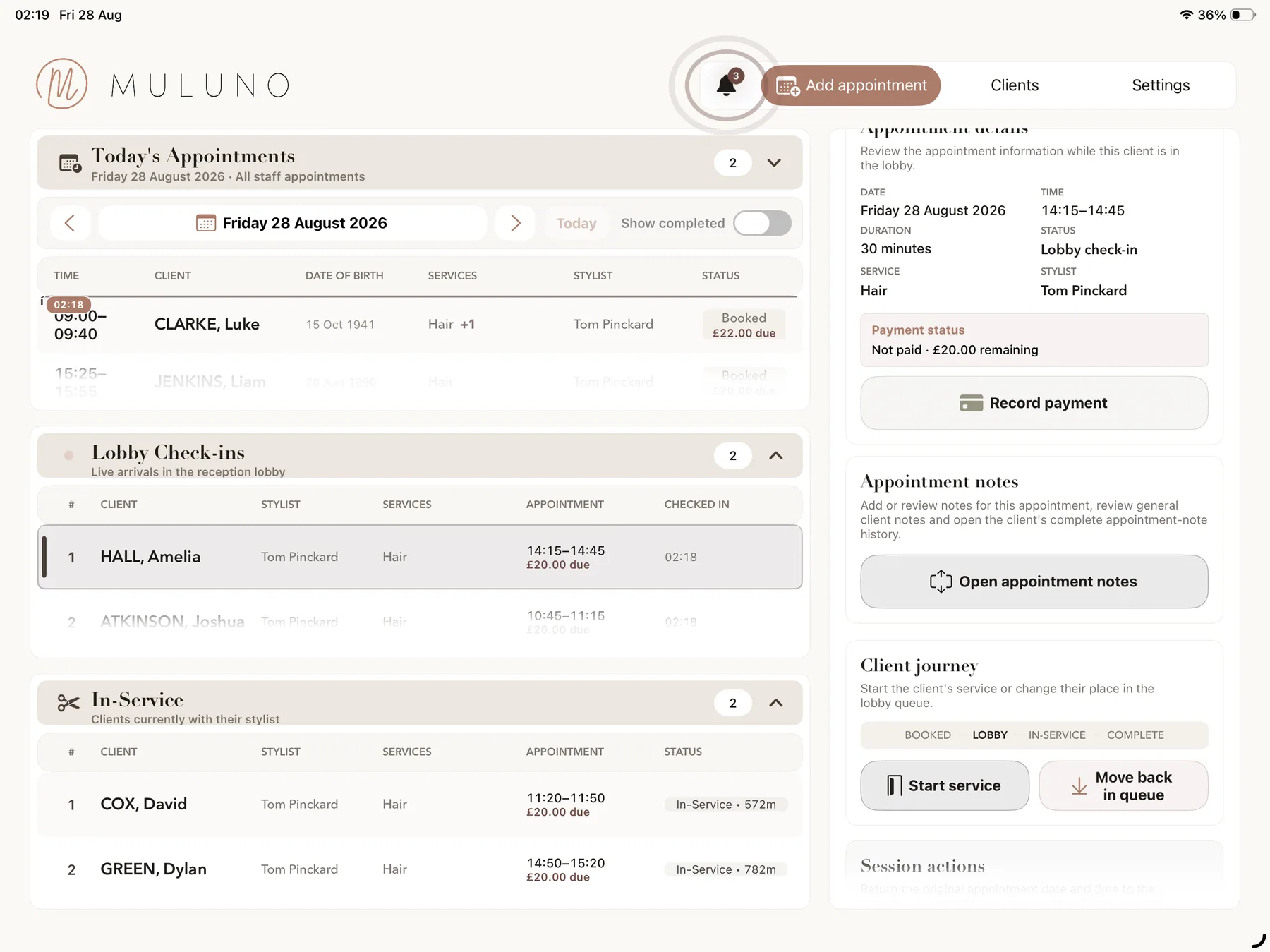
On Pro, send a consultation form to an active paired client-room iPad while the client is in service. This is an additional option alongside secure email delivery, not a requirement for using consultation forms.
Pro also includes kiosk check-in. Keep the distinction clear: arriving for an appointment and answering a consultation form are different steps, even when clients use in-store devices for both.
Pro is required for kiosk and paired client-room iPad workflows. Compatible devices, pairing, the relevant enabled modules and staff permissions are required. Grow includes emailed forms, not these in-store device workflows.
NOTES ON FREE. CUSTOM FORMS ON GROW & PRO.
Try Pro for seven days without a payment method or automatic charge. Then stay on Free or choose a monthly plan.
Appointments, client records and notes, services, a simple Muluno booking page and email reminders.
Everything in Free, plus website customisation and a booking widget, custom emailed consultation forms, standard insights and approved payments.
Owner plus up to five team members, with individual hours and leave. You can use Grow without adding staff.
Everything in Grow, plus kiosk check-in, paired client-room iPads, advanced financial and team insights and unlimited team members, subject to fair use.
UK App Store prices shown; confirm current pricing before purchase. Paid plans renew monthly unless cancelled in your Apple account settings. SMS credits are purchased separately on eligible plans. Payments require business verification, a signed agreement and Stripe approval; Stripe processing fees, supported-device requirements and security allowances apply. Compare all plan features →
MOVING FROM ANOTHER SYSTEM?
We can help transfer supported client, staff, service and future appointment records at no charge. Contact us first so we can review your export and confirm what can be moved.
Ask about your recordsFree managed migration is subject to review of supported exports and records.
Yes. Free includes client records and notes, appointment history, services, a simple booking page and email reminders for one owner. General client notes stay separate from notes about an individual appointment. Custom consultation forms and secure email delivery require Grow or Pro.
Yes. Grow and Pro let you create custom consultation forms, choose supported answer types, arrange questions and mark answers as required. You can use short or longer text, single or multiple choices and confirmations, with helpful guidance where needed. The relevant modules and staff permissions are required.
Yes. You can choose whether to include one electronic signature. When included, it is the final question and is required for that form. You can also use forms without a signature. You are responsible for the form's questions and statements; a signature does not by itself establish legal compliance or determine treatment suitability.
No. On Grow and Pro, send a secure email link for the client to complete in their browser after an identity check. Email delivery requires a set-up Muluno booking address, enabled forms and email modules, staff permissions, and a client record with a surname, valid email and phone details. The salon-management app is on iPhone and iPad; its browser workspace is in private preview.
You choose a consultation form and send its secure email link from Muluno. This is a send action you control, not automatic delivery for every booking. Grow or Pro, a set-up Muluno booking address, enabled forms and email modules, appropriate staff permissions and valid client details are required.
Completed responses stay in the client's consultation history. Forms sent for an appointment remain connected to that visit and visible in the client record. Completed forms, general client notes and individual appointment notes are distinct records, with access subject to staff permissions.
On Pro, a client who is in service can complete an assigned form on an active paired client-room iPad. Pro also includes kiosk check-in. Compatible devices, pairing, relevant enabled modules and staff permissions are required. Grow includes custom forms and secure email delivery, but not these Pro in-store device workflows.
Stay on Free or choose a monthly Grow or Pro subscription. No payment method is required for the seven days and there is no automatic charge. Free includes client notes and appointment history; custom forms require Grow or Pro, while paired client-room iPads and kiosk check-in require Pro. Paid subscriptions renew monthly unless cancelled in your Apple account settings. SMS credits are purchased separately on eligible plans.
FOR THE CONVERSATION BEFORE THE SERVICE

Available now on iPhone and iPad. 7 days of Pro. No card. No automatic charge.